
Get a business email with your own domain
Google Workspace gives you an address like you@yourbusiness.com. It works just like Gmail, on any device.
Start my free trial14 days free, then about $7 a month per person. This link takes 10% off your first year. Google bills you directly.
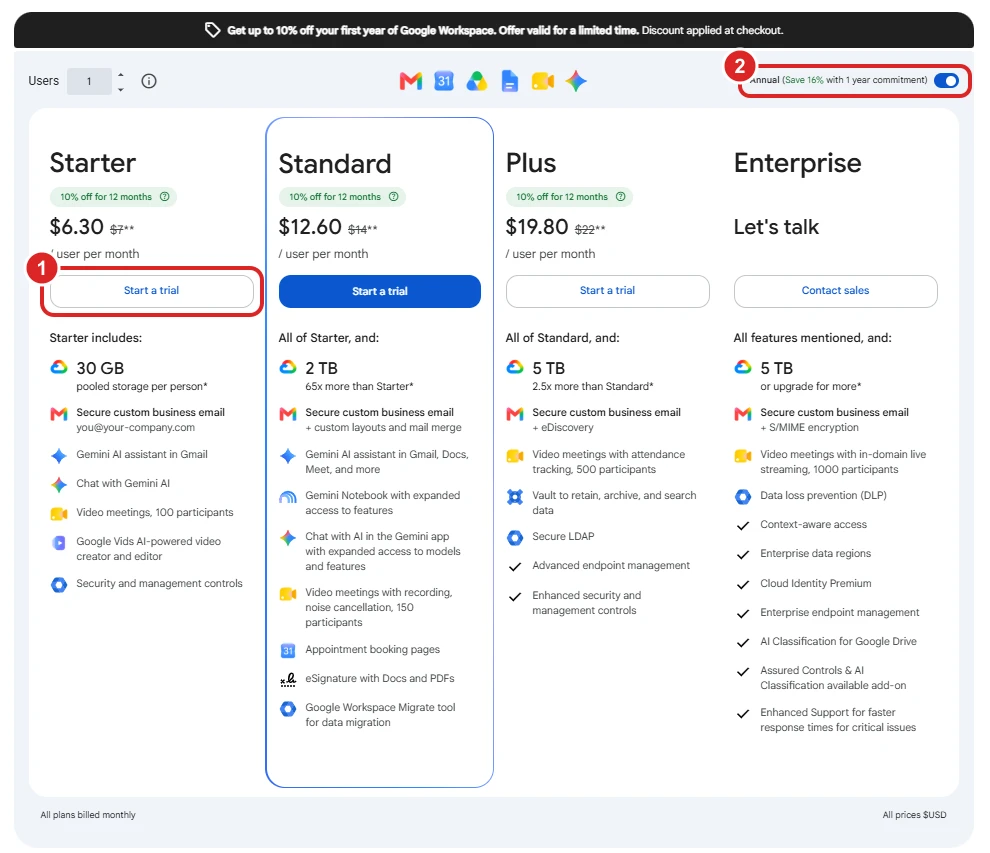
- 1Click this one.
- 2On means you pay yearly, which is cheaper. Off means monthly.
What to do, in order
Start the free trial
Open Google's plans page with the button above and click Start a trial under Starter, the plan on the far left. Then fill in your business name and contact info.
Pick your address
When Google asks about a domain, choose Yes, I have one I can use and type it in. Then pick your address, like contact@yourbusiness.com.
Send me a screenshot
When you reach Verify your domain, stop there. Screenshot it and send it to me. I'll connect everything on my end and text you when it's ready.
Sign in
Sign in at gmail.com or in the Gmail app with your new address. Then text me the address and I'll add it to your website.
Stuck on a screen? Send me a screenshot of it and I'll tell you what to click.